How to Get a 2x2 Picture into a 4x6 Picture
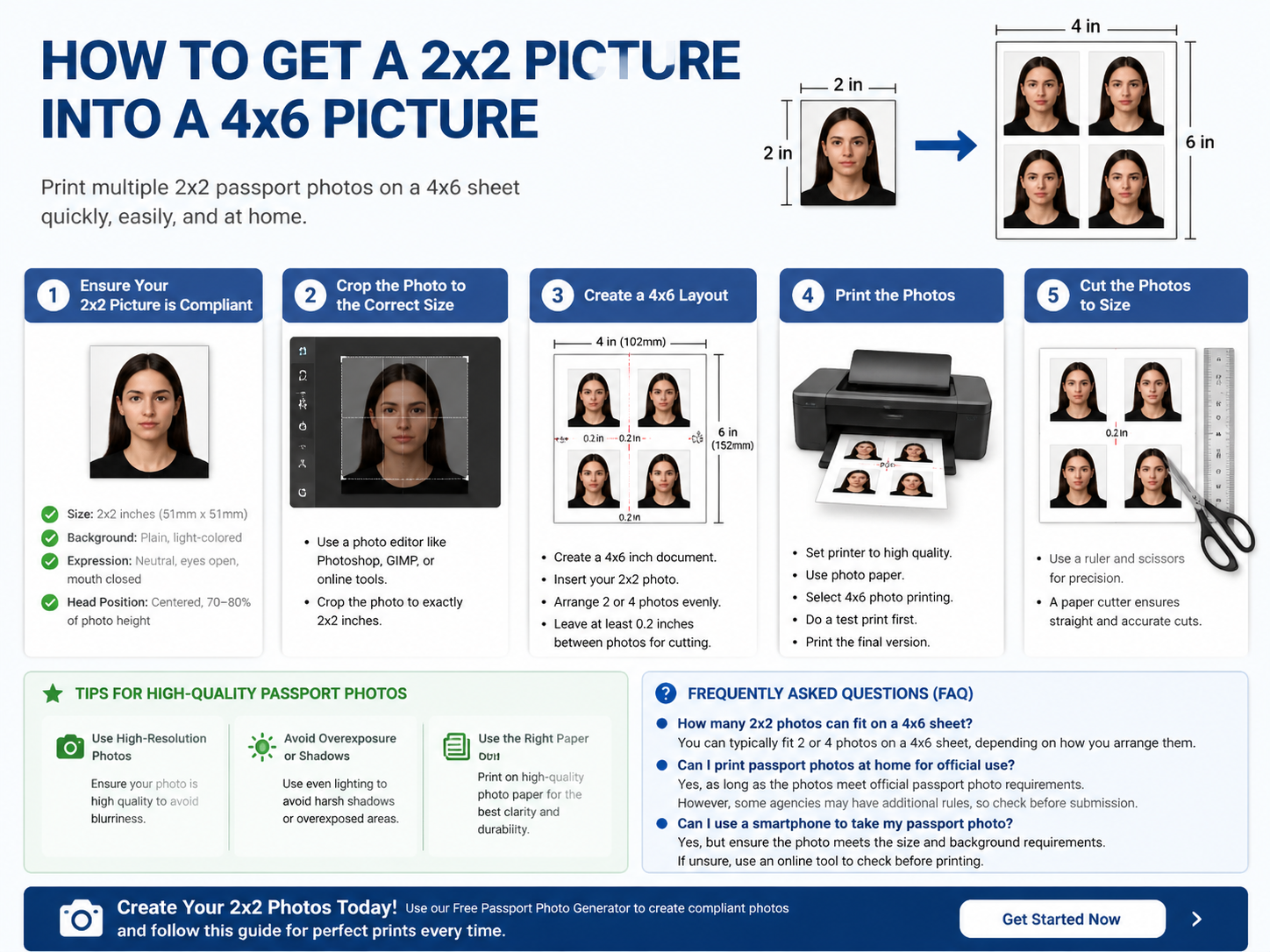
If you're looking to print multiple 2x2 passport photos on a 4x6 print, you're in the right place. Whether you need several copies of your passport photo or simply want to print in bulk, fitting your 2x2 picture into a 4x6 layout is a simple and efficient task.
This step-by-step guide will show you exactly how to resize and arrange your photo for easy printing while ensuring it meets official passport photo requirements.
For more general tips on passport photos, visit our Complete Passport Photo Guide.
Why Print 2x2 Photos on 4x6 Paper?
Printing 2x2 photos on a 4x6 sheet offers multiple benefits:
- Cost Efficiency: Instead of printing each passport photo individually, you can print 2 or 4 photos on one 4x6 sheet.
- Convenience: It saves time, as you don't need to visit a photo booth or store for prints. Simply print at home using your printer.
- Easy to Cut: A 4x6 paper layout allows for easy cutting of each photo to the exact 2x2 size.
For more details about passport photo printing, check out our How to Print Passport Photos at Home.
Step-by-Step Guide to Fit a 2x2 Picture into a 4x6 Print
Step 1: Ensure Your 2x2 Picture is Compliant
Before you arrange your 2x2 photo, make sure it meets the official passport photo requirements:
- Size: Your photo must be exactly 2x2 inches (51mm x 51mm).
- Background: The background should be plain, light-colored (usually white or light blue).
- Expression: Your face should have a neutral expression with your mouth closed and eyes open.
- Head Position: The head should be centered and cover 70-80% of the photo's height.
If you're unsure whether your photo meets the requirements, use our Free Passport Photo Generator to check.
Step 2: Crop the Photo to the Correct Size
If your 2x2 photo isn’t already cropped, you’ll need to adjust the size. Here’s how you can crop the photo:
- Use a photo editor: You can crop your photo using Photoshop, GIMP, or even free online tools.
- Online passport photo tools: To simplify the process, you can use our Free Passport Photo Generator to automatically crop and resize your photo to the required dimensions.
Step 3: Create a 4x6 Layout
Once your 2x2 photo is cropped, the next step is to arrange it on a 4x6 paper. This allows you to print multiple photos on a single sheet. Here's how to do it:
- Open a Photo Editor: Use Photoshop, Microsoft Word, or an online editor like Google Docs.
- Create a 4x6 Document: Set the paper size to 4x6 inches (102mm x 152mm).
- Insert Your Photo: Import the cropped 2x2 photo into the document.
- Arrange the Photos: Depending on the space available, you can arrange 2 or 4 photos on the 4x6 sheet. Ensure that the photos are evenly spaced and aligned.
- Leave Room for Cutting: Make sure there’s enough space between each photo for cutting. It’s best to leave at least 0.2 inches between each photo.
If you need a more streamlined process, use our Passport Photo Layout Tool for quick photo arrangement.
Step 4: Print the Photos
After arranging your photos, it’s time to print them. Follow these tips for the best results:
- Choose High-Quality Settings: Set your printer to high quality for the best image resolution.
- Use Photo Paper: Always print on photo paper for a high-quality finish.
- Check Printer Settings: Ensure your printer settings are configured for 4x6 photo printing.
- Test Print: Print a test page to make sure the layout and quality are correct before printing multiple copies.
- Print the Final Version: Once satisfied, go ahead and print your 2x2 photos on 4x6 paper.
Step 5: Cut the Photos to Size
Once the print is complete, you’ll need to cut the 2x2 photos from the 4x6 sheet. Here are some tips for cutting:
- Use a Ruler and Scissors: For precision, use a ruler to measure and scissors to cut the photos.
- Use a Paper Cutter: If you have one, a paper cutter is a great tool for ensuring straight cuts and accuracy.
Tips for High-Quality Passport Photos
Here are some essential tips to ensure your 2x2 photos print perfectly:
- Use High-Resolution Photos: A low-resolution image will appear blurry when printed. Ensure your photo is of high quality before printing.
- Avoid Overexposure or Shadows: Make sure the lighting is even to avoid harsh shadows or overexposed areas in your photo.
- Use the Right Paper: Always print your passport photos on high-quality photo paper for the best clarity and durability.
For more tips on improving your passport photos, check out our Complete Passport Photo Guide.
Frequently Asked Questions (FAQ)
How many 2x2 photos can fit on a 4x6 sheet?
You can typically fit 2 or 4 photos on a 4x6 sheet, depending on how you arrange them.
Can I print passport photos at home for official use?
Yes, as long as the photos meet the official passport photo requirements, you can print them at home. However, some passport agencies might have additional rules about photo quality, so be sure to check before submission.
Can I use a smartphone to take my passport photo?
Yes, but ensure the photo meets the size and background requirements. If you’re unsure, use our Free Passport Photo Generator to check your photo before printing.
Conclusion
Fitting your 2x2 photo onto a 4x6 sheet is an easy and effective way to print multiple passport-sized photos at home. By following these simple steps, you can create high-quality prints that meet all the necessary guidelines. Remember to use high-resolution images, photo paper, and follow the proper layout for the best results.
👉 Start creating your 2x2 photos today with our Free Passport Photo Generator and follow the steps outlined in this guide for perfect prints!